
Usage guide for Simien AI-assistant
Simien AI-assistant is an interactive support tool that helps users quickly get answers and guidance related to Simien software, energy modelling, and relevant standards. It provides context-aware help directly through a chat interface.
How to use Simien AI-assistant?
The images below illustrate how to open AI-assistant, ask questions, view and respond to answers, and manage your sessions.
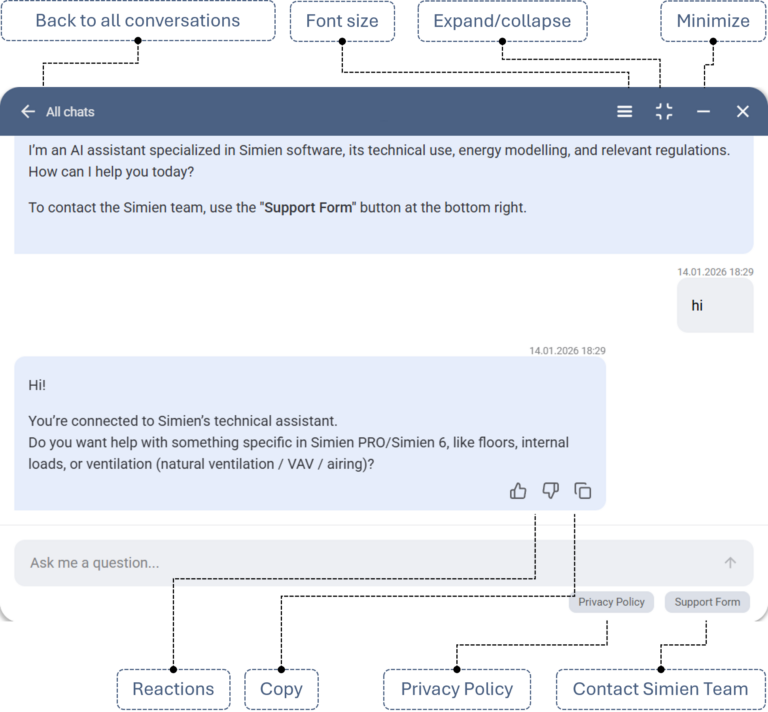
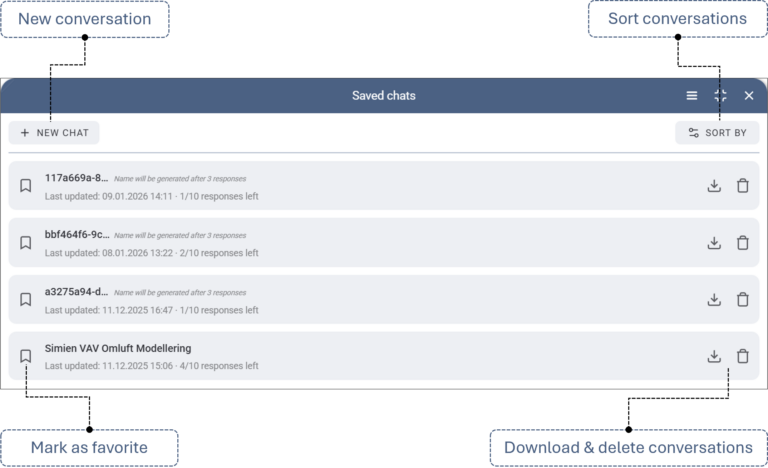
Talking to the Simien AI-assistant
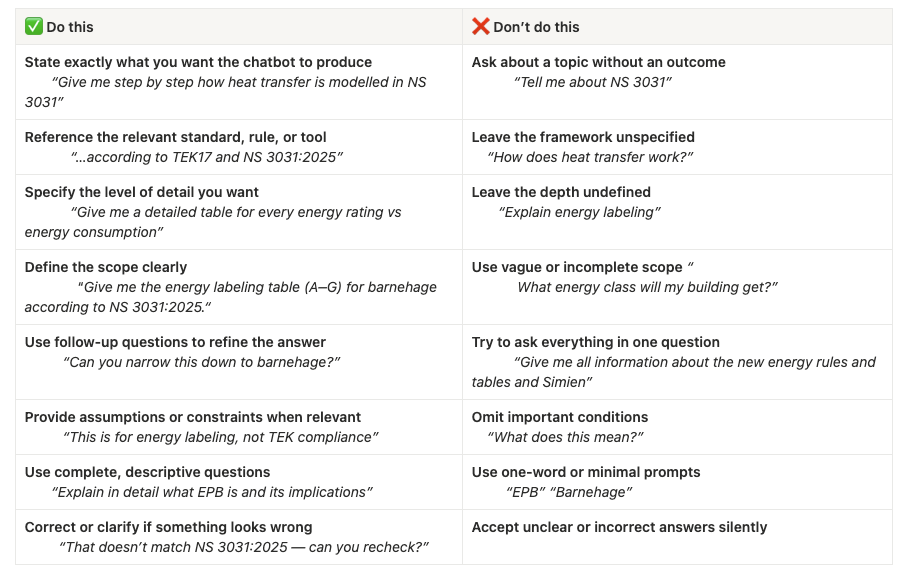
Best practices (short)
- Clearly state what you want the chatbot to produce (e.g. explanation, table, comparison, steps)
- Reference relevant standards, regulations, software, or dates (e.g. NS 3031, TEK17, Simien PRO)
- Specify the scope and level of detail (high-level vs technical, specific building type, tables, examples)
- Use follow-up questions to refine, narrow, or clarify the answer
- Provide assumptions, constraints, and context (purpose, building type, timeframe, etc.)
⚠️ Please react to the messages using 👍 or 👎 — this helps us improve.
Best practices (detailed)
To get the most accurate and useful answers from the chatbot, keep the following in mind:
Good examples from real usage:
- “Give me step by step how heat transfer is modelled in NS 3031”
- “Can you give me a detailed table for every energy rating vs energy consumption?”
Guideline:
Start your question with what you want the chatbot to produce:
- an explanation
- a table
- a comparison
- step-by-step instructions
- implications or consequences
High-quality questions explicitly reference standards, regulations, or tools.
Good examples:
- “…modelled in NS 3031”
- “new energy rating from 1st January”
- “according to TEK17 and NS 3031:2025”
- “How is this handled in Simien PRO?”
Guideline:
Whenever relevant, explicitly name:
- standards (NS 3031:2025, TEK17, …)
- software (Simien PRO, Simien 6)
- regulation versions or dates
The best questions clearly define how broad or narrow the answer should be.
Good examples:
- “Give me a detailed table for every rating vs energy consumption”
- “Explain in detail what EPB is and its implications”
- “Give me the energy labeling table (A–G) for barnehage according to NS 3031:2025.”
Guideline:
Explicitly say if you want:
- a high-level overview
- a technical explanation
- tables, formulas, or examples
- a single building type or all categories
The chatbot is designed to work conversationally. You can ask follow-up questions to:
- Clarify parts of an answer
- Narrow down options
- Request examples, explanations, or alternative approaches
Good example flow:
- “What can you tell me about the new grading scale?”
- “Can you give me a detailed table?”
- “Give me the table for barnehage.”
Guideline:
Use the session to:
- narrow from general → specific
- request clarification or missing pieces
- zoom in on one building type, scenario, or assumption
💡 You can ask up to 10 messages in one session, so use these to progressively improve and refine the response.
❗Sometimes the answer might stop midway. In this case, just text “Come again” or “Repeat that” to regenerate the complete answer OR start a new conversation
The best technical questions include conditions that affect the answer.
Good examples:
- specifying energy labeling vs TEK compliance
- referencing normative vs measured data
Guideline:
Include relevant constraints such as:
- building type or use
- regulatory purpose (energy label, TEK check, analysis)
- timeframe (new rules, upcoming changes)
- whether you want normative or realistic assumptions
If something looks incorrect or unclear, point it out and explain what seems off. The chatbot can adjust its response when given additional guidance or corrections.
➡️ In general: The more relevant context and guidance you provide, the more accurate, useful, and tailored the chatbot’s response will be.
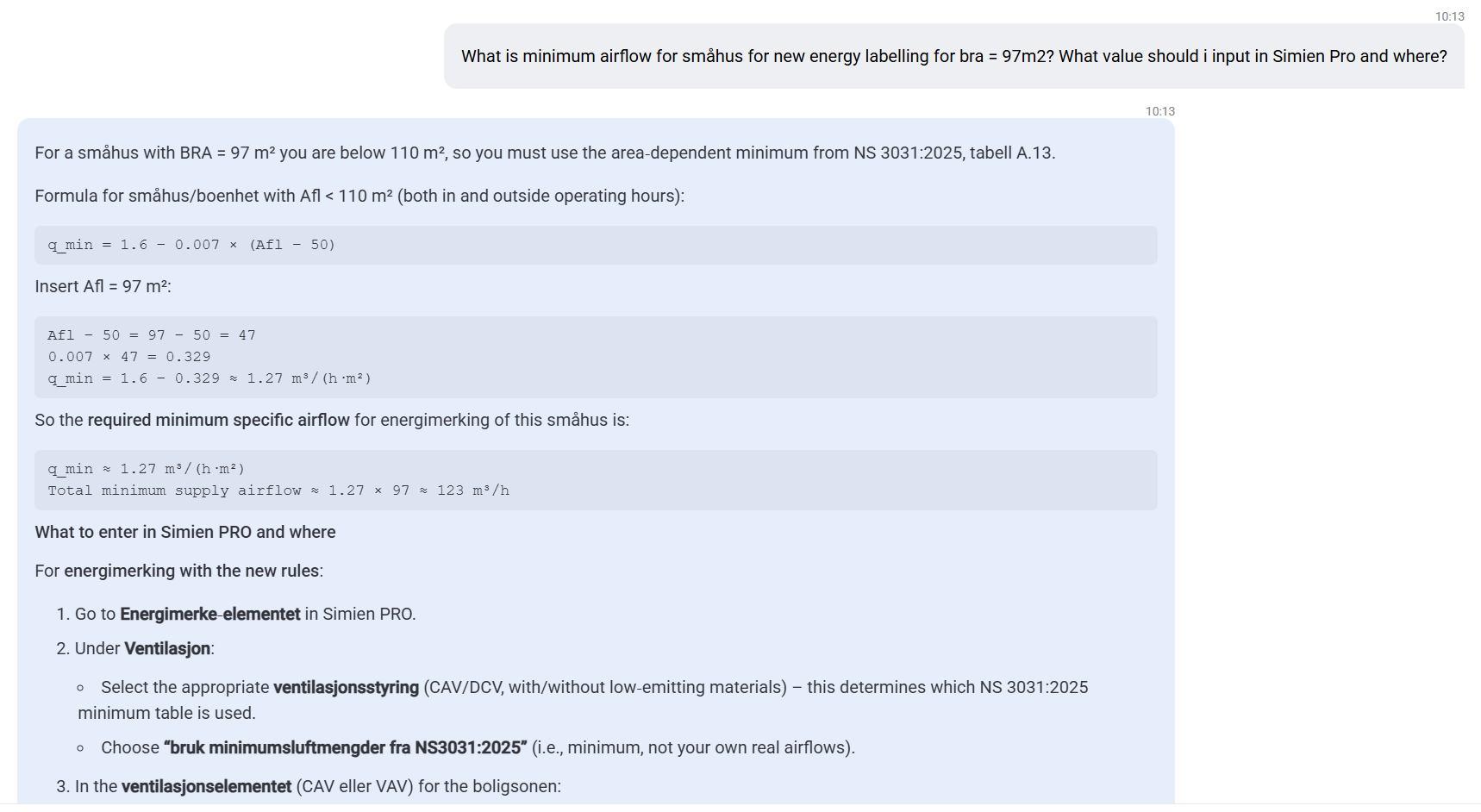
Following is an examples query on Simien LiveDesk showing it’s capability to deliver fast, standards-based answers with clear calculations and direct guidance for use in Simien PRO.
Examples of unsuccessful queries (and why they fail)
❌ “Tell me about NS 3031”
Why this doesn’t work well:
- Could mean theory, calculations, tables, history, or application in Simien
- Forces the chatbot to guess what user wants
❌ “How does heat transfer work?”
Why this doesn’t work well:
- No reference to buildings, standards, or software
❌ “Explain energy labeling”
Why this doesn’t work well:
- Unclear whether the user wants:
- a short overview
- regulatory requirements
- calculation method
- implications for projects
❌ “What energy class will my building get?”
Why this doesn’t work well:
- No building type (house, barnehage, etc.)
- No reference to new vs old regulations
- No energy data, assumptions, or calculation context
❌ “Barnehage”
❌ “Ny karakterskala”
Why this doesn’t work well:
- The chatbot cannot infer what the user wants:
- definition?
- table?
- implications?
- calculation method?
- Often leads to overly generic answers
Still didn’t get what you were looking for?
If the chatbot doesn’t answer your question (even after using all the tips from Best Practices):
- Download the conversation from “Alle samtaler”
- Contact Simien Support
- Include:
- Your original question
- The downloaded chat session as an attachment
This helps support understand the context quickly and assist you more effectively.